
GO 4 Schools comes preconfigured with the DfE's standard set of attendance marks as listed here. Each of these marks is configured to contribute to the appropriate category of mark - authorised absence, unauthorised absence, approved educational activity, etc. By default staff can enter any of the marks, but most schools will want to limit the list of marks that can be entered by staff to a minimal set of present (/ and \), late (L), and absent (N). Attendance officers can then replace absence marks with more specific codes such as I or M. A school manager or attendance officer can set this level of access on the Attendance marks page, which is accessible from the Attendance settings page in the Attendance menu.
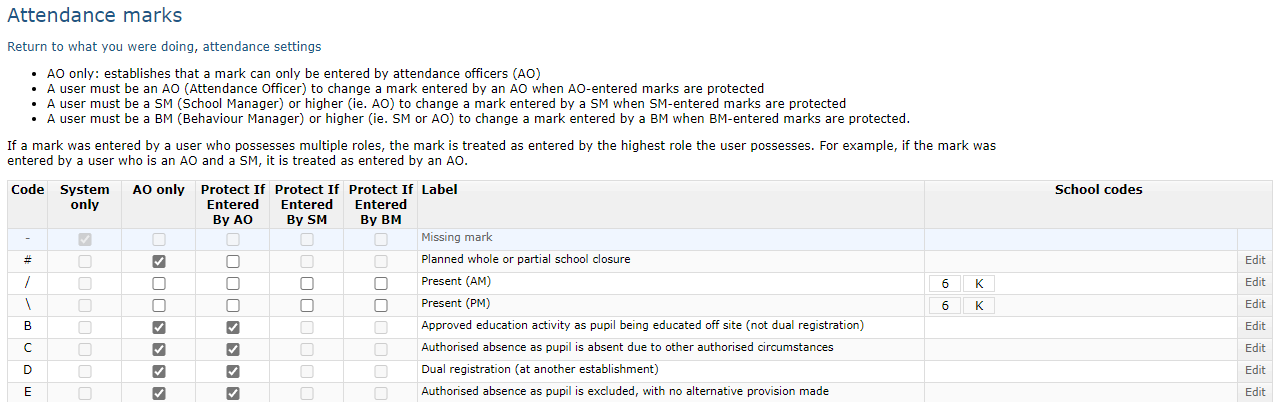
 In the table shown, for marks which you do not want available to teachers, tick the box in the column labelled AO only. If you also want to protect those marks from being overwritten by teachers, you can tick the boxes in the columns Protect if entered by:
 Levels of protection
There are three levels of protection available based on the roles a user had when they entered a mark. The roles involved in the hierarchy are attendance officers (who have the highest level), school managers, and behaviour managers. We would recommend that all marks are set to Protect if entered by AO.
If a mark is protected by behaviour managers, it is also protected for school managers and and attendance officers. If a mark is protected for school managers, it is also protected for attendance officers. When a user has multiple roles, their marks are protected by the highest level they hold.
The reasoning for this is that attendance officers are responsible for ensuring accurate attendance, and they usually enter specific marks for students that should not be overwritten by teaching staff/registration tutors. School managers also may record attendance for students with atypical attendance patters, and behaviour managers may record exclusions, or in some instances use an alias/attendance code to record that a student is dealing with a behaviour issue, in which case you wouldn't want teachers/tutors to overwrite, but an attendance officer may need to overwrite with something more appropriate.
Using special codes if you're a SIMS school
If your school is using the "attendance write-back" to sync data from GO 4 Schools back to SIMS, you must be aware that there are certain codes which SIMS will not accept externally, this means they must be entered into SIMS directly, however they will be synced from SIMS to GO 4 Schools for you. These codes are:
- Y (and its derivates e.g. Y1)
- Z
- # - this code in particular cannot be picked up from SIMS currently, so it will need to go into both GO 4 Schools and SIMS.