The timetable and calendar settings are available under the curriculum menu. The page is used to set the display of various timetable information to students, parents, and staff. The page is also used to set your start and end of academic year, holidays, training days, and if you have a two-week timetable, which weeks are 1 and 2.
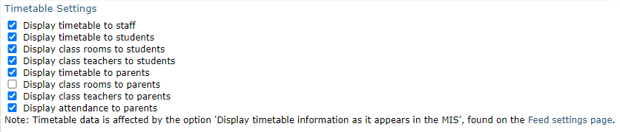
The Timetable settings section of the page allows you to specify whether timetable information should be shown to staff, students and parents. When it is displayed to students and parents, you can decide whether to include information about the teachers and rooms used for each class.
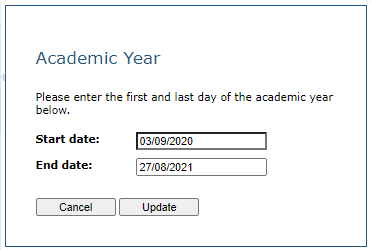
The School calendar section of the page allows you to specify the start and end of the academic year. Each new academic year's dates will be populated with approximate dates based on the previous year's data, but it is the responsibility of the school to check that these dates are correct and amend them if required:

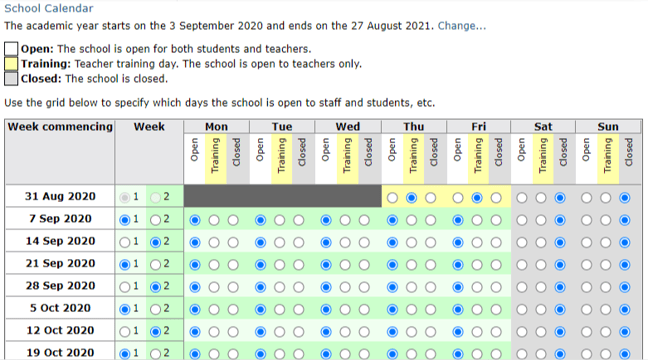
Once your academic year dates have been entered you will be able to mark which days the school is open, closed, or training. To calculate accurate attendance statistics, your calendar must be set up correctly, and match your MIS. If we detect from your timetable feed that your school operates a two-week timetable, you will be given an additional Week column to specify for each week whether it is week 1 or week 2. The rows will also be alternately coloured to make them easier to differentiate. If you change a week, you will be asked if you want the following weeks re-populated to alternate the pattern. Once your calendar has been set up, click the Save button.