
Markbooks are used to collect marks for your subjects. Markbooks will be automatically created for each subject in GO 4 Schools. To set up a markbook, you need to assign a qualification to the subject. Navigate to the subject page, and click on the link to go to the subject settings:

This will take you to the subject settings page. Under Qualification click on the Choose... This will open the qualification picker:
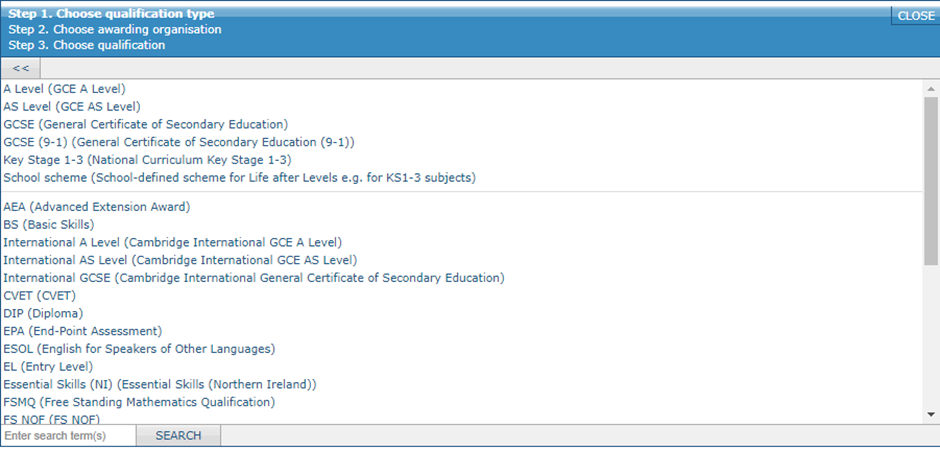
Here you can either click through the various levels to find your qualification, or use the search box to narrow down the qualifications. Alternatively if you know the QAN code you can enter that. Notice the appearance of School scheme, here is where you can select one of your internal grading schemes to act as a qualification.
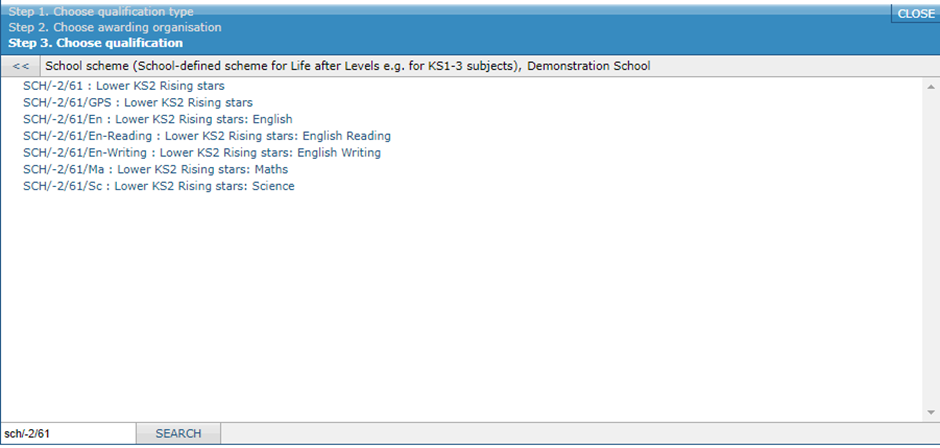
If you are choosing a school scheme for a core subject, then you should select the appropriately named copy of the scheme you wish to use (English for English, maths for maths, etc.) An advantage of this is that where the school scheme has values, GO 4 Schools will use the special versions of the grade schemes to generate year group level statistics.
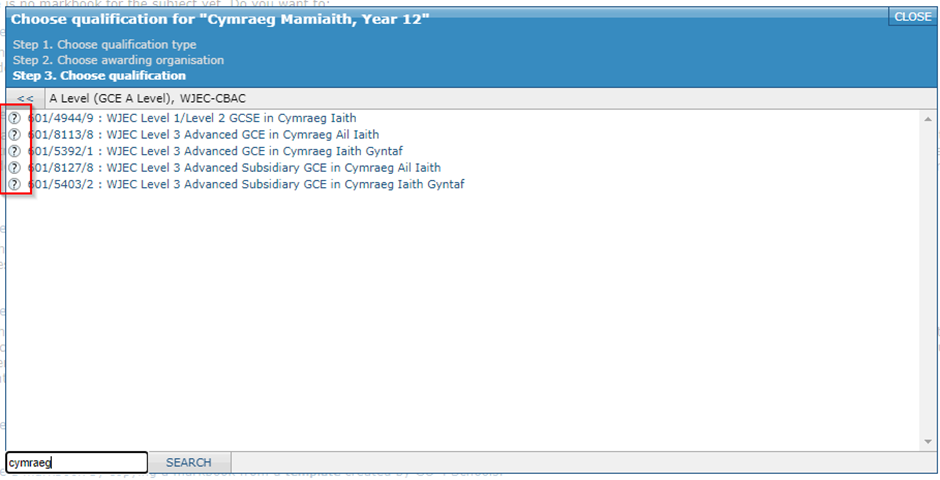
When choosing an official qualification there are ? icons to the left of each course. These allow you to view the information about each course on the Ofqual web site, which should help you decide between two qualifications with similar names.
You should be careful when selecting the qualification for two reasons:
- Once a markbook is set up, you can't change from a qualification that awards one set of grades to one that awards a different set of grades without resetting the markbook (which will delete all marks held). For example, you cannot change the qualification from a GCSE to a vocational subject because the GCSE uses grades A,B,C, etc, whereas the vocational uses grades of Pass, Merit, etc. Be especially careful with vocational subjects, where names are similar, but the grades may vary. Where a custom grading scheme has been selected you will always be required to reset the markbook to select a new qualification.
- GO 4 Schools uses the choice made to provide the set of grades available for your subject and to calculate the whole-school pass rates etc. For instance, GO 4 Schools understands the size of qualifications, if you chose the wrong qualification, GO 4 Schools will perform the wrong calculation.
If you need to change the qualification, you can do so by clicking the Change/reset... link that will replace the Choose... when a qualification is linked to a subject. If you need to change to a qualification that uses different grades, you will need a school manager to remove the existing grades.
Special cases
- Fine grades: For GCSE/GCE qualifications you can choose to use either the formal grades, e.g. A,B,C, etc or fine grades, e.g. A+, A, A-, B+, etc. The fine grades can be used to help differentiate students with high Cs from those with low Cs for example. The formal grades are those awarded by the exam boards, and have specific point scores, whereas the fine grades are simply provided for convenience. Within GO 4 Schools the fine grades carry the same point scores as the corresponding formal grades, this ensures that the numeric points calculations are accurate.
- Key stages 1-3: Special qualifications have been included in GO 4 Schools to help you track KS 1-3 courses. These can be found under the “Key Stage 1-3” option in the qualification chooser (picture above). There are specific qualifications for English, English Reading, English Writing (use the last two if you want to track the reading and writing strands separately), Maths and Science. For other KS1-3 course you should choose the “General” qualification. Each of these qualifications is offered in two versions: a version with P Scales and a version without. The grading scheme without P Scales is “shorter” and is therefore easier to work with if you don’t need to record P Scales.
- School schemes: You can use a school-defined internal grading scheme in place of a qualification to monitor student progress using your own school measures. If your internal grading scheme has numeric or school score values assigned, it can be used in progress measurements.
- Informal tracking: If you want to collect marks for a subject that does not correspond to a formal qualification you can create a school scheme and incorporate any grade names for tracking purposes.
are designed to make it easy to track progress on learning outcomes in BTEC and similar style qualifications. Each marksheet within the markbook can be marked as core, mandatory, or other and represents a unit that is worth credits/guided learning hours (GLH).
Note: For simplicity GO 4 Schools refers to units being worth credits, but be aware that some BTEC qualification specifications refer to GLH instead of credits. The calculations are the same, regardless of terminology.
Internal assessment marksheets typically contain an assessment per learning outcome within the unit. External assessment sheets can record the result of one or more attempts at an externally assessed unit. The current grade will calculated by assessing if the student has accrued enough credits and then converting those credits into points to calculate the student's grade.
This calculation will also check that a result has been recorded for all core and mandatory units (a near pass for an external unit and a pass for an internal unit are treated as accepted outcomes for a mandatory unit), and that sufficient points have been scored across the core units.