
Login Mechanisms
There is only one mechanism available for parents logging on to the GO 4 Schools web site:
- Remote Access login – where the parent provides their email address and password. This mechanism allows parents to log in from school or home.
Login requirements for remote access
For a parent to be able to log in to GO 4 Schools the system needs to know:
- Their email address, which are retrieved from your MIS as part of the nightly feed.
- Which students they have parental responsibility for, which is retrieved from your MIS as part of the nightly feed.
- They must have students who belong to an academic year/year group that has had parental access enabled for.
Controlling parent access by academic year and year group
For each academic year that you use GO 4 Schools you can independently control access for the parents of each year group: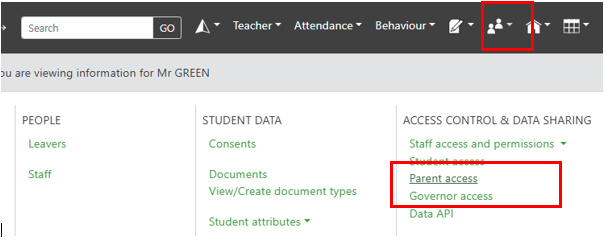
This can be useful if you want to “stagger” access to GO 4 Schools. This is available at the top of the parent access page:
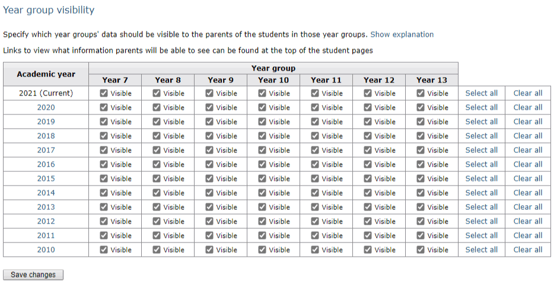
To disable access for a specific AY/Year group combination, you deselect the tick, and then save the page - to enable access, you click the visible box, and save. For example in the above image, if I wanted to hide the previous academic years for my year 11 parents, I'd deselect Year 10 2020, Year 9 2019, etc.
Checking parental email addresses
GO 4 Schools relies on email addresses drawn from your school's MIS to identify parents. The feed system only retrieves email addresses for parents who are marked as having parental responsibility in your MIS. All other contacts are ignored.
You can review the data held by GO 4 Schools using the Parental access page:
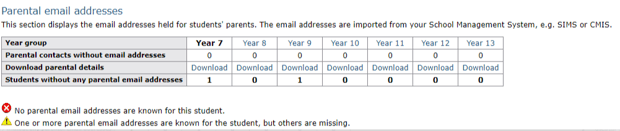
If a student is marked with a red cross, it means that either no parent is known for the student, or that one or more parents are known but their email addresses are not known. This means that there is no way for the student’s parent(s) to log on to GO 4 Schools.
If a student is marked with a yellow triangle, it means that one or more parental email address is known, but there are other parental contacts for which email addresses are not known. This may indicate that one of a student’s parents may not be able to log on to GO 4 Schools.
An understanding of the child’s family circumstances is required to decide whether these red crosses and yellow triangles need addressing by updating the data in your MIS and waiting for the nightly feed to update GO 4 Schools. The list of students/parents for each year group is downloadable as a CSV for review using the download links.
Setting a parent's password
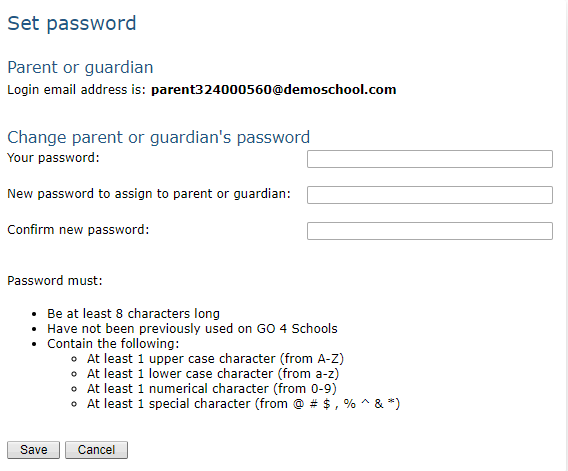
If an email address is available for a parent, a Set link will be offered in the Password column. Clicking this link takes you to a page where you can provide a new password for the parent. For security, you will need to provide your own password too.
FAQ's about parental access
- Where does the list of parents come from?
The list of parents is drawn from your school's MIS as part of the nightly feed.
- What happens if a parent forgets their password?
On the parent login page they should click the link "Forgotten your password?", enter their email address, and a link will be emailed to them to set a password, as long as the email address is one recognised by GO 4 Schools. Alternatively you can set their password for them as described above.
- If a parent has parental responsibility for multiple students, will they require multiple accounts?
For each parent we hold a single user account and password. If a parent has parental responsibility for multiple students, they should log in to the GO 4 Schools parent site with their email address and password, and they will be given a list of students to choose from. This will work even if the students are at different schools which use GO 4 Schools.
- Can parents still access GO 4 Schools during the summer break?
Parents will be able to log in as usual during the holidays. However, it is important to note that parents of the year 11/13 leavers will only be able to log in up until the point when the academic year change over takes place. Once the new timetable is uploaded to the schools MIS and the year end procedure is run on GO 4 Schools, those parents will no longer have access. It may be beneficial to advise parents of this so that they can download and print any reports they would like to keep.
Troubleshooting parent access
Parent unable to log in
- Check that they are logging into the Parent version of the site as opposed to the Student or School version.
- Check that the correct email address is held for them on the Parental access page.
- Check that they are the parent of a student in a year group whose data has been made visible to parents via the Parental access page