
Copying a markbook is useful in several situations:
- You use the same structure for assessment in multiple subjects, e.g. Year 7 French and Year 7 German.
- You want to re-use a markbook you created in a previous academic year, e.g. to record the same assessments for current year groups that you have previously.
- You are teaching a two or three year course and you want to carry forward the previous markbook.
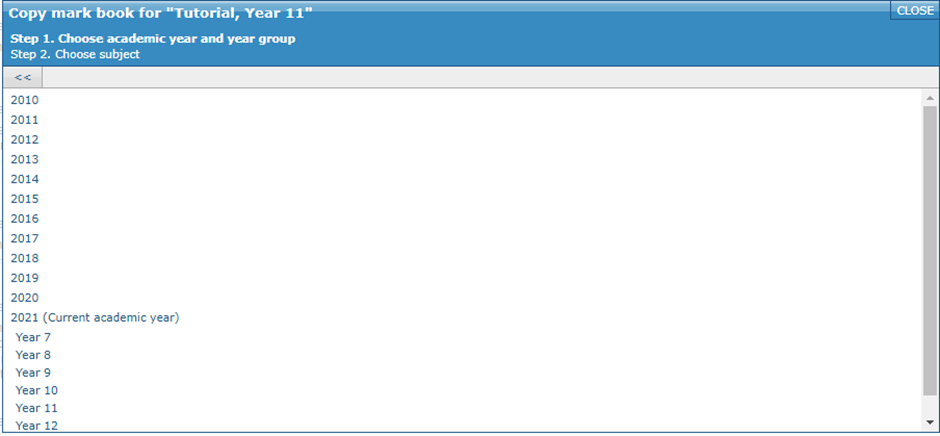
If you want to copy a markbook, you should choose the option to Create a markbook by copying a markbook from this or an earlier academic year. When you click this link you will be offered a list of existing source subjects from the current and previous academic years.
When copying a markbook you are given four options:
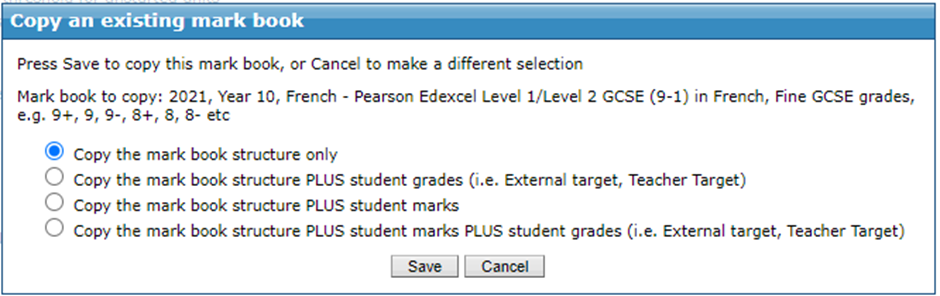
If you choose to copy marks/grades, GO 4 Schools will copy them from the source markbook to the new one wherever possible. Marks will be copied only for students studying both the source subject and the target subject.
Notes:
- Copying is a pull process: You need to start at the markbook editor for the subject you want to copy to, and then choose the subject you want to copy from.
- Copying is only available for empty markbooks: If you have already started creating a markbook for a subject, the copy option will not be available, in this instance, you'd need to reset the current markbook to then be able to copy to it.
- Consistent grades: When copying a markbook, any grades for the subject for which you are copying to must match the grading scheme for the markbook you are copying from. For example you cannot copy a markbook set up for a mastery scheme into a subject which uses GCSE style targets.
- Changing qualification: Once you have copied a markbook you can change the selected qualification by clicking the Change/reset link at the top right of the markbook editor and then using the Choose qualification option. The qualification chosen must use the same grading scheme as the markbook you've copied.