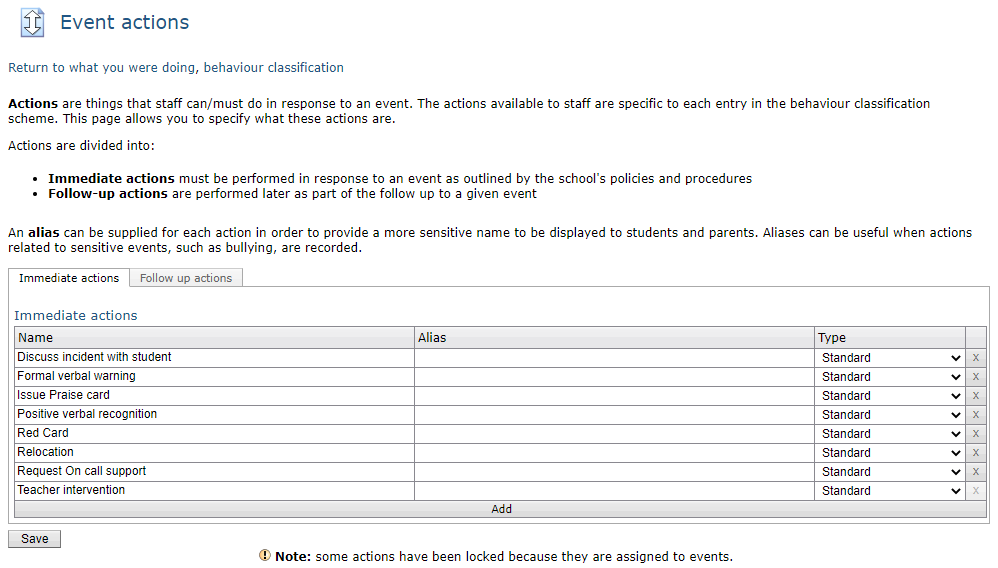
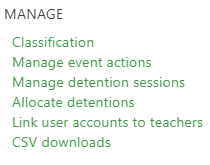
Immediate and follow-up actions are specific things staff should do as and when events occur. The set of immediate actions that you use within your school is defined using the Manage event actions link in the Behaviour menu:
The event actions page allows you to manage both immediate and follow up actions, as well as set what type of follow up action they are.
- To add a new action, click the Add button at the bottom of the list and type in a name for the action in the left-hand column.
- To rename an action, highlight the text in the left-hand column, and replace the text.
- To provide an alias for the action, type text into the right-hand column. Aliases are useful if you want parents and students to see different language. An example would be an immediate action of Implement school bullying policy but aliased as Appropriate action taken.
- To remove an action, click the X to the right of the action - please note that actions that are currently linked to events cannot be deleted.
- The type column allows you to set the action type as either standard, detention, or managed detention. Please note that managed detention actions are only available as follow-up actions.
- The Follow up actions tab can be selected to set up follow-up actions.
- The Save button will save all changes.