
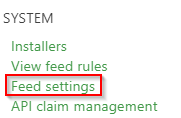
To manage how GO 4 Schools processes certain data from your feeds, school managers can use the feed settings page available under the Manage menu:
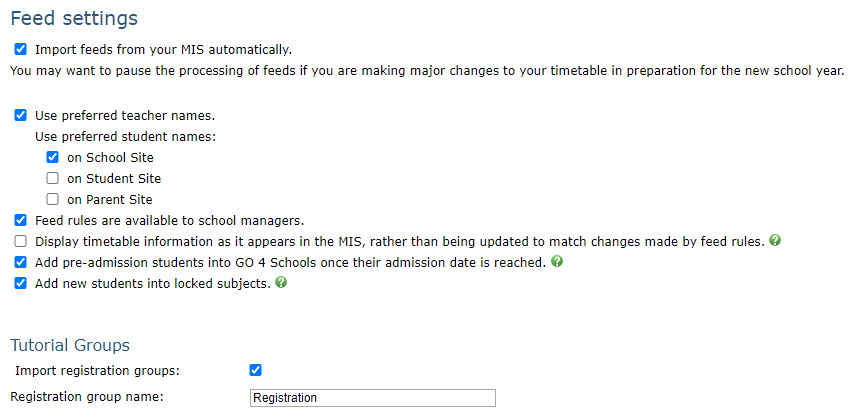
There are are set of tick boxes on this page that control how we process data to display in GO 4 Schools:
- Import feeds from your MIS automatically - this tick box will allow you to temporarily stop the processing of feeds by GO 4 Schools, this is useful if you are making major changes to your timetable in preparation for the new school year, but do not want to allow those changes to display in GO 4 Schools immediately
- Use preferred teacher names - this allows you to choose to display teacher preferred names across the system.
- Use preferred student names - this allows you to choose to display student preferred names to school, students, or parents individually.
- Display timetable information as it appears in the MIS, rather than being updated to match changes by feed rules - when this setting is selected, we will display timetable information as it arrives to us in your overnight timetable feed. When this setting is deselected, GO 4 Schools will attempt to apply certain feed rules to the timetable information, for example when a group is moved out of one subject into a new subject, we will show the new subject on the timetable. If you are having problems with the information displaying in timetables it may be because your feed rules make it difficult to correctly assign these links. In this case it may help to switch on this setting.
- Add pre-admission students into GO 4 Schools once their admission date is reached - This setting is only applicable to SIMS schools, selecting this checkbox will add pre-admission students into GO 4 Schools if your general feed processes on the morning of their admission date, even if you have not formally admitted the student(s) in SIMS. This can help you see new students in GO 4 Schools on the first day of the academic year. Warning: This may result in students being added to GO 4 Schools who do not show up at your school and are therefore never formally admitted. Please raise a support ticket if you find these pre-admission students are affecting your attendance statistics. This rule applies on the student(s) admission date, and the next 7 days, giving you time to admit or delete the student. After this time, the student will be treated as a leaver in GO 4 Schools if they are not yet admitted.
- Import registration groups - This setting controls whether GO 4 Schools should import your registration groups and allows you to set the name of your Registration subject. This should be enabled unless you timetable your registration periods as a class on the timetable.
Feed system security settings
The values listed below this section should be entered into the security tab in the GO Configuration Tool on your school server. Copy the 2048-bit private key into the feed tool if you are using version 2.3.0 or later (released in April 2018), or copy the 1024-bit private key for earlier versions of the feed tool.