
Grade files and baseline grade files
GO 4 Schools allows you to upload various types of grades for students. These are uploaded as grade files, which use the CSV (comma separated value) format. The three key formats for progress/target grades are presented below. Grade files are most easily produced in Excel, and then saved to your computer’s hard disk as CSV files before being uploaded to GO 4 Schools.
If some of your students have unusual characters in their name (such as ö or é), please ensure that you are using UTF-8 encoding in your grade file, or use UPNs instead. The simplest way to do this is to open it in Notepad and then select File > Save As… from the menu. In the dialog, select Encoding: UTF-8 at bottom right.
This format is suitable for uploading target grades and progress grades, and while it is the basis for baseline grades, there are some key differences covered later on:
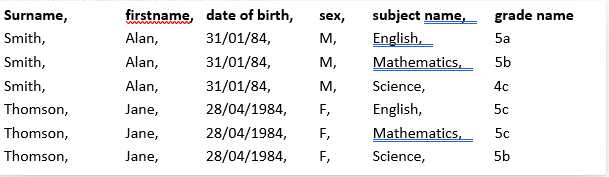
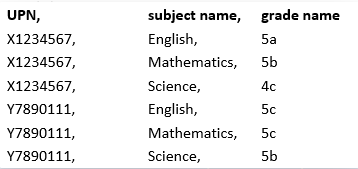
As you can see, there is a row in the file for each combination of student and subject. It is acceptable to use students' UPNs in place of Surname, firstname, date of birth, and sex:
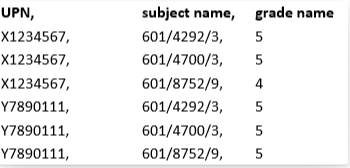
It is also possible to replace the subject name with a QAN code instead:
Intermediate format
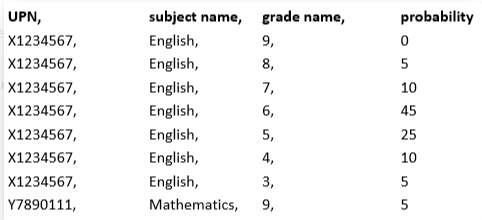
This format is suitable for uploading target grades if your file contains probabilities for a student achieving a range of grades (up to 10). The range will not display in GO 4 Schools, the most likely grade will be used:
Advanced format
This format is suitable for uploading target grades if your file contains probabilities for a student achieving a range of grades (up to 10). The range will not display in GO 4 Schools, the most likely grade will be used:

As above, you can use either UPN or the combination of surname, first name, date of birth, and sex, as well as use the QAN code instead of subject name, but the header row should not be included in this file type.
Baseline grade format
Baseline grade files must follow the simple format as detailed above, with the exception that subject names cannot be used, and instead you must use a QAN code, or special code:


Grade file conversion
You may receive your external target grades and actual grades in a format that contains one row per student and one column per subject. You can use the Grade File Conversion tool to convert from this format to the format that GO 4 Schools requires. Links to the Grade File Conversion page can be found as a link from the bottom of each of the grade upload pages.
The grade file conversion page will only accept the Simple format described above, if you'd like to use UPNs with the conversion page, you need to provide four columns with the UPN (representing the surname, forename, d.o.b, and sex). Once the file is converted, you can remove the extra UPN columns.