
The Level 3 Value Added (L3VA) statistics in GO 4 Schools calculate individual student, departmental and cohort figures. This enables in year tracking against expected progress using the 2019 national data set to support Post 16 intervention and improvement. The latest 16-18 accountability measures (February 2024) outline this measure will return as a published measure in academic year 2024.
The DfE Ready Reckoner (from which GO 4 Schools L3VA data is drawn from) creates estimated L3VA outcomes using prior attainment bands for each subject from the national data set. This was last updated in January 2020 using the 2019 cohort data. The DfE will publish an unvalidated Ready Reckoner for this Academic year (AY 2024) in the Autumn of 2024, with a validated version to follow in January 2025.
More information on the ready reckoner including the latest updates can be found by clicking here.
Many schools use the L3VA statistics for tracking against outcomes. The L3VA data for 2019 still underpins the 16-19 School Inspection data summary report (IDSR) and is the only data document that OFSTED use for Post 16 during school inspections. Moving forward, the 2024 data will be displayed in the IDSR when it becomes validated in the early part of 2025.
L3VA calculations use prior attainment based on the 9-1 numeric values from qualifications at Key stage 4. Therefore, a student’s prior attainment with an exact average of grade 7 will have a prior attainment of 7.00.
It is worth noting at this point that if you use prior attainment values in the 9-1 format then you WILL NOT be able to use the estimates from previous years (2017, 2016 or 2015) as they work on the old baselining methodology even though they are still present in the system.
Please remember that L3VA is a retrospective measure therefore, although a good indicator, it is not the exact score that your school will achieve.
Calculating prior attainment values for your students for use with 2019 estimatesThe prior attainment values for the current year 13 (Academic Year 2022) are available from Secure sign in.
If you have uploaded your 2023 GCSE results into GO 4 Schools the system will have calculated the values for Year 12 (academic Year 2024) based on the data that you have entered, see the section Using previous data in GO 4 Schools for prior attainment values in this document. This will obviously not include the students that have entered your 6th form from other institutions.
Therefore, the methodology described below needs only to be used for year 12 cohorts for Academic Year 2024 if you have not uploaded GCSE results in Academic Year 2023 and for students joining your school for the first time in Year 12. These should be checked/replaced when the official data is released later in the year.
If you have all the data required the section titled Uploading prior attainment into the system will show you how to get the prior attainment values into GO 4 Schools to generate L3VA scores for cohorts and subjects.
A level and Academic cohortsA level is a subset of the academic cohort (which includes all A and AS levels and other academic courses such as core maths and the extended project). Schools who do not have any non-A level academic courses can turn off the academic cohort.
Likewise, the applied general cohort can be disabled if not required. The settings for this can be found under Statistics and Analysis Settings on the Curriculum menu. This is also where you can change the L3VA estimates to the appropriate settings e.g. 2019 (default) – our latest set at time of writing.

Prior attainment values for the A level and academic cohort are identical but do need to be uploaded twice see the section titled Uploading prior attainment into the system.
For the A Level and Academic cohort only GCSE qualifications are used in the prior attainment calculation – GCSE excluding equivalences.
Example student academic/A Level year 12 AY 2021 prior attainment calculation.
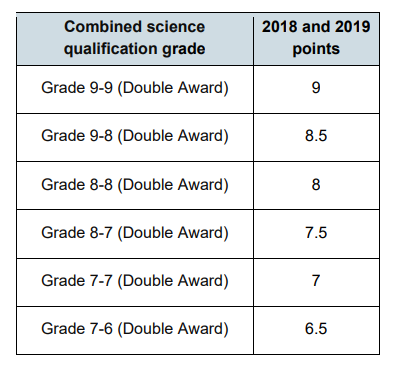
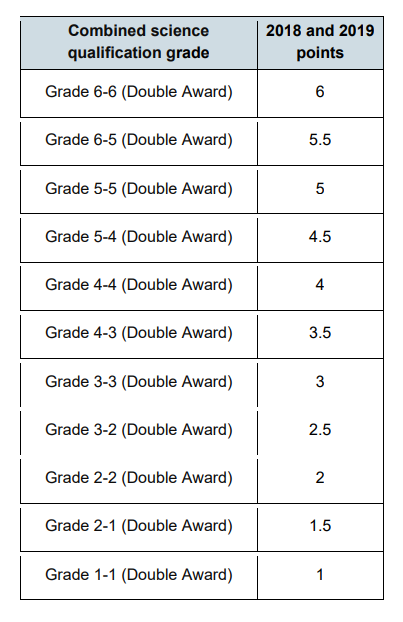
Below is an example of a year 12 student who took all 9-1 qualifications. They also achieved a qualification in combined science. Combined science is treated as a single entry and uses the points below for each grade type.
English literature 7
English language 5
Maths 6
Combined science 6-5
History 7
Business studies 7
German 8
Product design 7
Calculation of prior attainment is:
7 + 5 + 6 + 5.5 + 7 + 7 + 8 + 7 = 6.56 Prior attainment (A level and Academic) = 6.56 (2 d.p.)
8
Applied GeneralThe prior attainment values for the applied general cohort works on the same principal as the A level. However, the applied general cohort contains GCSE grades (GCSE including equivalences) and all other Level 2 courses the student may have taken.
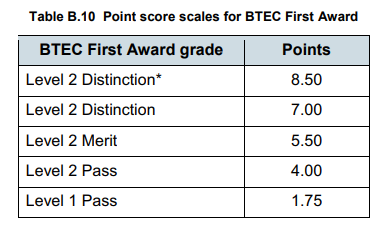
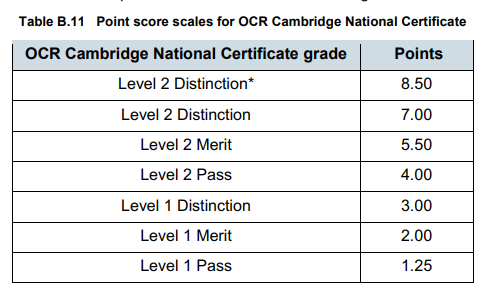
The Secondary Accountability measures will support the calculation of prior attainment of all level 2 courses that your students have achieved. Below are the two most common tables which will be used to calculate the example student’s prior attainment.
Example student applied general year 12 AY 2022 prior attainment.
English literature 5
English language 5
Maths 4
Combined science 6-5
BTEC Health and Social L2 Dist
Business studies 7
German 8
OCR Creative iMedia L1 Dist
Calculation of prior attainment is:
5 + 5 + 4 + 5.5 + 7 + 7 + 8 + 3 = 5.56 Prior attainment (applied general) = 5.56 (2.d.p)
8
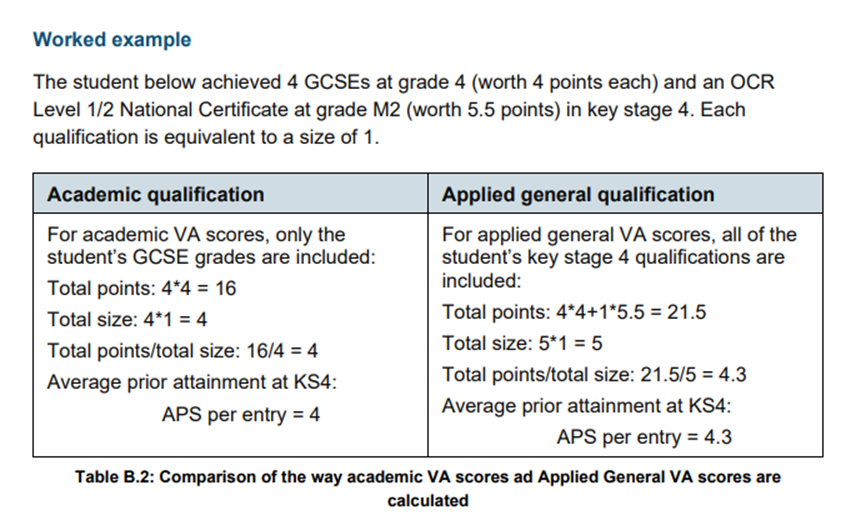
DfE ExampleThe DfE have added their own examples in Annex B of the revised 16-18 guidelines.
 Using previous data in GO 4 Schools for prior attainment values
If you have student data for your Year 12 in academic year 2023 when they were in Year 11, GO 4 Schools will have two average numeric point calculations per entry for each student (excluding equivalencies or including equivalencies). These values are located in the corresponding Year 11 year group explorers. This will obviously only contain values for students who were on roll in Year 11.
The values in the explorer will be like the calculated values using the methodology above. If there is an official data release from the DfE these Qualifications that the students have studied off timetable e.g. home languages and graded musical instrument examinations may not have been added to GO 4 Schools by the school.
The differences in the averages could affect the band that the student is allocated to (normally one of twenty in each subject) and therefore adjust the expected prior attainment in the subject and the L3VA values over different grade types (e.g. target, current, predicted) at your school.
We therefore recommend using these values with caution. However, for many of your students the values will be very close if not identical to the calculated average and we understand that using these values will involve far less time than calculating scores manually for each student.
It is worth remembering that L3VA scores like progress 8 scores are using retrospective data so the scores that are displayed although very useful for guidance are not the actual scores that your students will achieve.
The values for the A level and academic cohorts (identical values) and the applied general cohort can be found in the following sections of the previous academic year(s) new year group explorer. You can turn back to a previous academic year by selecting the Academic years menu, and choosing the correct year.
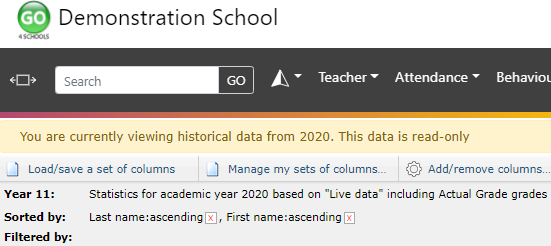
Once in the correct academic year, you can open the year 11 year group explorer. Once in the new year group explorer you will need to add the add/remove columns link at the top of the page.
The column sets for use with the prior attainment values are located in the following areas. Firstly, for applied general and secondly for A level and academic:
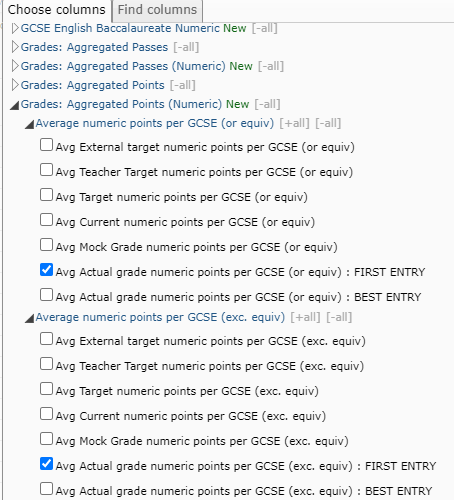
It is worth mentioning that you may have changed the name of the actual grade to something else (e.g. “Exam result”) at your school.
Once you have added these columns we recommend that you delete all other columns in this view other than Last name, First name by clicking the corresponding X’s on the image below.
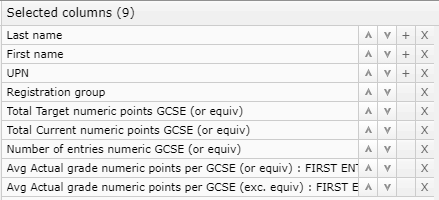
This should leave you with the following screen with the prior attainment values (the first column for A level/academic and the second column for the applied general cohort.
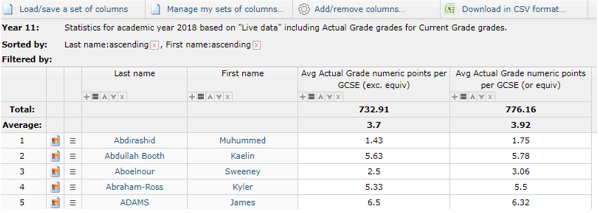
By using the “Download in CSV format” below you will then have a .csv file that can be used in conjunction with the prior attainment attributes, see below.
Uploading prior attainment into the systemFor L3VA scores to appear in the system you will need to upload prior attainment values to 2 decimal places into a “Special attribute”. The three special attributes (one for each cohort) can be found under Student Attributes on the People menu (see below).


As mentioned previously the A Level cohort and academic cohort prior attainment values are identical and should be uploaded twice.
If you select the “manage values” link this will take you to a screen which gives the opportunity to upload and download the values for your L3VA prior attainment values. If you have not added in any values previously you will need to add a set of values with “no timestamp”.
By downloading the file first (see highlighted in blue on next page), you will have the correct template by which to upload the scores into the system (UPN, Surname, First Name, DOB, sex). Values can also be manually typed if required.
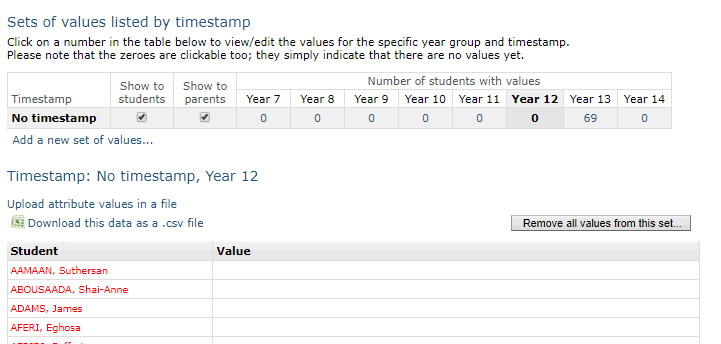
Once the values have all been uploaded into the system you should return to Statistics and Analysis settings on the Curriculum menu and select the most recent estimates for all your relevant L3VA cohorts.
 Analysing L3VA data
If you want to explore L3VA further, we have written a document on Analysing Data using L3VA. This can be found here L3VA Analysis.