
Key stage 4 Performance measures - Progress 8 (2022)
This document is intended to help you ensure your Progress 8 measure is accurate.
The headline measures for schools in England include:
- Progress 8 – shown as a value added score from KS2 prior attainment
- Attainment 8 – an attainment score using the same eight qualifications which are used in the calculation of Progress 8
- Attainment in English and Maths as a percentage achieving grade 5+
- EBacc APS – English Baccalaureate Average points score
- EBacc entry – percentage of students entering the English Baccalaureate
- Pupil destinations* - percentage of students staying in education or employment after KS4
[*This measure is not a key statistic in GO 4 Schools but can be tracked].
Progress 8
Progress 8 is a school measure that captures the progress students make from the end of KS2 to the end of KS4. It is a value-added measure, which means that student’s results are compared to the progress of other students nationally with similar prior attainment. Progress 8 is calculated at student level to calculate a schools average Progress 8 score. The Progress 8 score should not be shared with students. Details of the methodology for Progress 8 can be found in the DfE KS4 accountability guidance.
The average Progress 8 score for ‘mainstream’ schools in England is zero.
A positive score means students in the school on average do better at KS4 than those with similar prior attainment nationally, and a negative score means those students on average do worse.
Students with extremely negative progress scores
At school level a small number of students with extremely negative scores can have a disproportionate affect on the school’s Progress 8 score. This tends to occur when middle or high achieving prior attainers do not achieve the expected outcomes at KS4. Reasons for this are often out of the school’s control, i.e. long term illness. For this reason, a minimum progress score is assigned to pupils where there is an extremely negative score, this shows as the ‘adjusted Progress 8 score’ in GO 4 Schools. Currently this is a -3.5 cap.
It is worth checking if the overall Progress 8 score is not as expected. The Adjusted Progress 8 feature can be turned on by selecting the Show adjusted Progress 8 statistics option in Curriculum > School > Statistics and analysis settings.
Key stage 2 Prior attainment
From 2022, Progress 8 will be calculated using the KS2 average scaled scores from English reading and maths. The scaled scores use values from 80 to 120 from the SATs, with values for students below the standard of the test having a scaled score converted from a teacher assessment; these range from 59 to 79. The DfE has a range of bands for grouping the scaled scores to view national transition matrices and for the values used in the Attainment 8 estimates. See our guide to KS2 data.
Progress 8 is impossible to predict
Progress 8 is calculated using the exam results achieved by the national cohort in the same academic year. The national examination data is used to create the Attainment 8 estimates that compare students with the same KS2 prior attainment with their KS4 outcomes, using the numeric points across eight qualifications. The Attainment 8 estimates also include the information across the four slots of attainment – English, maths, EBacc and other subjects.
Schools will use the Attainment 8 estimates from a previous academic year to track in year progress for current KS4 cohorts. Used as a tracking indicator this can support and evidence improvement in student outcomes, and school intervention, by utilising it as a thermometer of change. Tracking an improving Progress 8 score across key focus groups, and for each Attainment 8 bucket reflects an improving cohort, regardless of the Progress 8 actual number. Using this alongside the student’s Attainment 8 score, and average numeric points, will give schools a clear indicator of progress.
GO 4 Schools updates the A8 estimate set based on examination results. A provisional A8 estimate set is produced from results uploaded by schools into GO 4 Schools. This is then updated with the provisional set of estimates from the DfE as soon as these are published, which tends to be some weeks post-results.
As Progress 8 is based on the performance of the cohort nationally it is important to remember that an individual school’s score is relative to the performance of all other secondary schools.
Note: The 2022 cohort has transitional grade boundaries, set between the 2019 and 2021 boundaries due to the impact of TAGs and grade inflation. Using the 2022 A8 estimates in future academic years needs to be treated with caution.
Progress 8 score - What to check
We suggest that you might want to consider the following.
KS2 Data
- Have you uploaded values to GO 4 Schools for KS2 English reading and KS2 maths scaled scores for all students in the cohort who took KS2 SATs?
- Consider reviewing your source data by going back to GIAP and look for KS2 results for students who joined your school after the start of year 7.
- Ensure that you have a gap for students without KS2 results, rather than giving them a KS2 value of 0, which would lead to an incorrectly large Progress 8 score.
- The only gaps in KS2 results should be for students who did not sit KS2 tests (usually because they have come from abroad or from the independent sector since the start of secondary school).
One way to check this is using the new year group explorer, add columns from ‘Prior attainment (KS2) node for English reading scaled score, maths scaled score and KS2 scaled score average. Using the sort and filter functions allows identification of students with missing KS2 data.
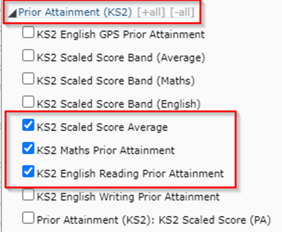
Please see further details about using Teacher Assessment grades for students who have test grades of B and N. This can be viewed in the DfE KS4 performance, Methodology document.
We recommend reviewing the KS2 for secondary schools article to find out more ways of analysing the prior attainment data in GO 4 Schools.
Statistics settings
The Progress 8 score appears in a range of places in GO 4 Schools; Key statistics and detailed statistics on the year group pages and in data explorers, charts, and markbook pop-outs.
To ensure the Progress 8 statistics are visible go to Curriculum > Statistics and analysis setting page to ensure the Progress 8 is visible. Under DfE KS4 Estimate ensure the Year groups are using the most recent estimate set as below:

Under Visibility of statistics also make sure the Progress 8 and KS4 GCSE 9-1 table are ‘Enabled’.

Under Progress preferences ensure calculated baselines are in use including B and N grades:

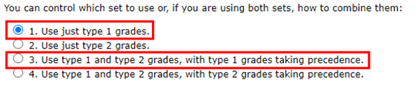
Make sure the setting is using either type 1 grades as below, this will ensure the KS2 scaled score averages are calculated and visible in GO 4 Schools.
Student statistics rule
GO 4 Schools will lock students into your attainment statistics following the January census for Y11, Y12 and Y13. If you have any special cases where you need to include or exclude students, this can be applied using the Student statistics rule in Manage > Student attributes > Student attributes. Criteria for discounting students from performance tables are published on the tables checking website as part of the tables checking exercise. Any students that the rule is applied to will update the headline measures in the key statistics and detailed statistics tables. Note that data explorers and subject statistics retain all student values.
Key statistics and detailed statistics

Progress 8 on the key statistics and detailed statistics will display for the enabled grade types. When expanded the fine points and scores for each of the slots are also visible. If enabled the adjusted Progress 8 scores will also display.
The values are live data so by clicking into any value for any grade type you will be taken to the year group data explorer to display all values at student level with the totals and average for the default columns displayed.

The KPI cohort can be used to filter out students not included in stats and or the KS2 column to filter out students with no prior attainment. The average values will update. Some useful tips for analysis include:
- Adding in additional data such as prior attainment groups, SEND, FSM can be a useful way of applying filters or sorting students to review focus group data.
- A quick sort by ascending prior attainment will show students with low KS2 scores and their relative Progress 8.
- Sorting by low to high Progress 8 score will reveal any significant outliers or those where an adjusted Progress 8 score has been applied.
Focus group statistics
Viewing performance measures by a focus group
By selecting the Focus group link on the year group page, you can view the list of statistics including Progress 8 by any student attribute that has been set in GO 4 Schools as Use for analysis of attainment and is included in an attribute set.

Viewing performance measures by a range of focus groups
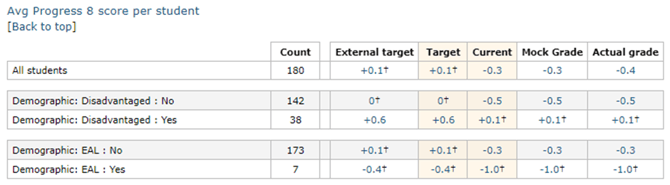
From the detailed statistics page, accessed from Full statistics link on the year group page, you can select Show/hide focus groups to select a measure i.e., Progress 8, and then a table will display the Progress 8 score for a range of focus groups that have been set for analysis.
Student Page
You can view KS2 data for an individual student from the student page. KS2 grades are displayed under Key grades/levels achieved.

Clicking on a value in the Progress 8 value on a student page displays the Progress 8 breakdown for the student for that grade. This gives detailed information on how the Attainment 8 and Progress 8 has been calculated for that student.

As well as listing the subjects included in each slot of the Attainment 8, the calculation is shown for the Progress 8. Selecting the Attainment 8 estimate will redirect you to the full list of estimates in use.
NB: Check the KS2 English reading and maths are correct as missing data will impact the calculation for the Average KS2 scaled score used for the Attainment 8 estimates.
Subjects and qualifications
View the subjects and qualifications page by year group to view the qualifications attached to your subjects. Where a subject does not show a discount code it will not be counting in your Key Performance Indicators. Ensuring you have the correct qualifications assigned can make a big difference to your statistics. See checklist in Annex A.
Attainment 8 Slots filled
How has your curriculum changed in response to Progress 8? Is this having an impact on your Attainment 8/Progress 8 scores? It may be useful to check the average number of slots filled per element by drilling down from the key statistics as shown below.
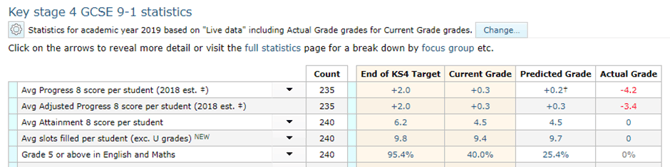
It is possible to further explore empty slots from the year group explorer or by drilling down by clicking on the figures shown in the above table. This is useful for reviewing the curriculum for students with SEND and comparing their entries.
Data Explorer
Clicking on the Progress 8 figure on the year group statistics page that you are interested in investigating, will open the year group explorer containing students’ individual Progress 8 scores. You can then order the students by their P8 figure, which may help you to spot if all students are lower than expected, or if the majority of students are where you expect them to be, and you have a small number of students pulling down the Progress 8 score for the whole year group. From the figures in the year group explorer, you can drill down further into the student detailed breakdown page for an in-depth investigation.
Which Attainment 8 estimates are being used?
What settings are you using for the Attainment 8 estimates? Experimental sets based on national GO 4 Schools data, and unvalidated estimates provided by the DfE, are available at the beginning of an academic year. This helps schools visualise how their KS4 results may look prior to the validated data sets being released. We aim to update estimates as soon as they become available.
Annex A
Checking for Progress 8
|
Ensure KS2 scaled score data is uploaded for English reading and maths. |
Upload as an actual grade in Year 6 for the cohort. |
|
Ensure Progress is set to use type 1 grades in statistics and analysis settings. |
Type 1 grades are Y6 actual grades. Setting to be using the calculated baselines and including B and N grades. |
|
Ensure Progress 8 and KS4 statistics are enabled in the visibility of statistics. |
|
|
Check the estimate set in use. |
2022 estimate sets should be used with scaled score data. |
|
Check you are using valid English and maths qualifications. |
GCSE English language, English literature, and maths qualifications only. |
Checking Subjects and qualifications
|
Check correct qualification assigned to correct subject. |
Check from Curriculum > Subjects and Qualifications |
|
Ask exams officer to check QANs – ensure QANs match entries. |
Check with exams officer. |
|
Check there are no discount codes missing (eg. art) in Y10 – Y13 for subjects that count in Performance tables.
|
Check from Curriculum > Subjects and Qualifications Click on spanner to manage subject settings directly from subjects and qualifications page. Click Change qualification link and Choose qualification. Selecting the correct one will pull discount code through (some subjects which do not count in performance tables will not have a discount code). |
|
Check if any warning flags are showing qualification withdrawn on Ofqual site. |
Check Ofqual site and refer to exams officer. |
|
Ensure you have both English language and literature.
|
If English literature is not taught until Y11, you may wish to copy grades from language for Y10 into a markbook for literature in order that English is double counted in A8/P8 calculations and used for the EBacc measure and open slot (where appropriate). |
|
Ensure any BTEC subjects where students are being entered for different levels e.g., L2 Certificate or L2 Extended. |
Need a separate markbook for each version of the qualification that students will be awarded. |
|
Decide if you need analysis of specific statistics for non-timetabled subjects e.g. First language, twilight GCSE’s. If markbook/subject statistics are not required, then upload results as an actual grade by QAN code (making sure you use the correct date of award). Otherwise create subject via feed rules to see subject level statistics. Either way, these subjects where relevant will be included in your headline performance measures. |
Use feed rule to create subjects that do not already exist if you need subject level analysis. |
|
Check for correct qualification. A common error is to have an A’Level QAN for students doing an AS in Y12 or changes to exam board during KS4. With the reformed subjects, departments may have swapped boards since the markbook was created. |
Go to subject and qualifications page to check QAN codes with actual examination entry. |