
The approaches to tracking EYFS in GO 4 Schools are varied, both in subject organisation and content. When setting up EYFS tracking systems, schools need to consider how much detail they want to include, what they want to see for analysis, and the ease of access and time implications for teachers. The following will show examples of how EYFS could be set up and the benefits of each approach.
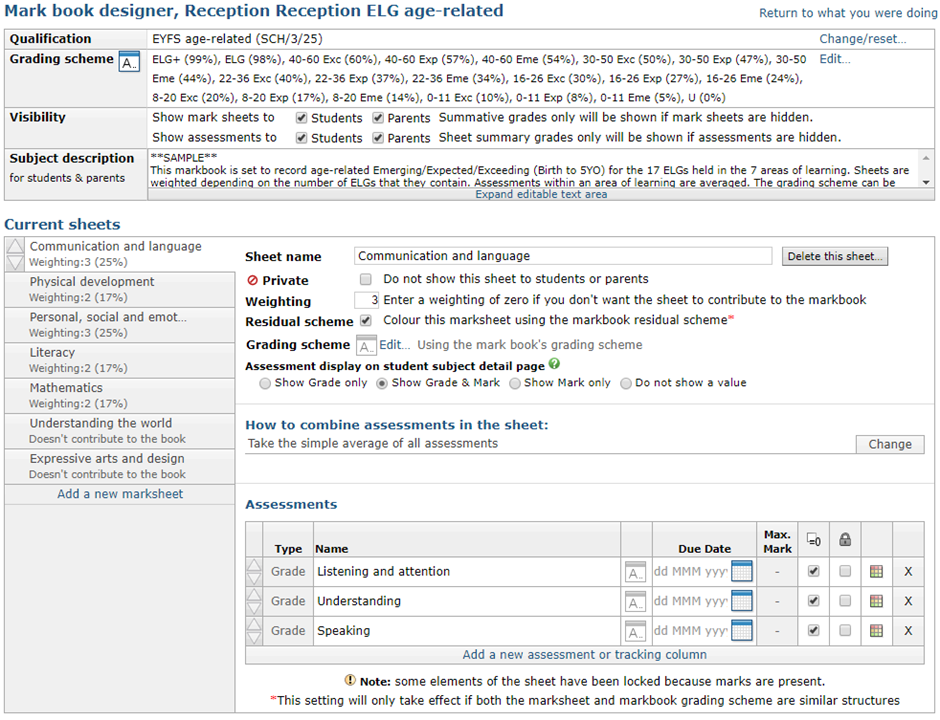
1. Single markbook approach ( 7 areas of learning)
Single markbook containing 7 sheets for the areas of learning, with the Early learning goals in the appropriate sheet.

This approach is quick and easy to access, and contains all of the data in one place. If the weightings and grading schemes are set correctly, this will automatically generate GLD statistics, which can be displayed using the new ribbons. This approach gives statistics for overall performance, but it is difficult to get a breakdown by Area of learning or Early learning goals.
2. Markbooks for the areas of learning
7 Markbooks for the areas of learning, with Early learning goals as sheets within the markbook.
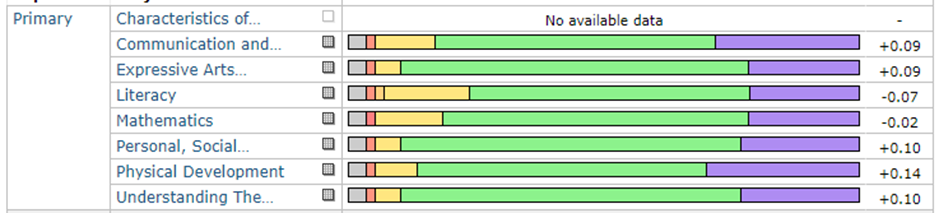
This approach will show the statistics broken down into the 7 areas of learning. From the table above, it is easy to compare how well students are doing in relation to their targets in each of the areas. It will also be possible to analyse the data by each of the areas in the new ribbons. To see an overview of a student, the year group explorer could be used to show grades and residuals for each area, and then use the postcard view, or this can also be seen on the student page under ‘Detailed progress’.
From a teacher’s perspective, they would have to go into 7 markbooks if they were trying to enter data across the board for a single student, and they would have to calculate GLD separately.
3. 17 markbooks for Early learning goals
17 markbooks for the Early learning goals (this school also has a markbook for GLD)
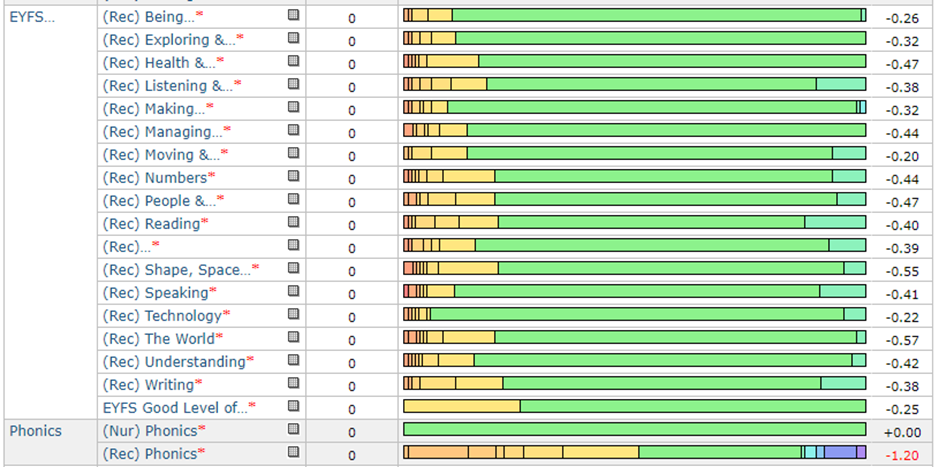
This approach gives a finer level of statistics but requires staff to go into 17 markbooks to enter their data. As with the 7 markbook system, each markbook would have a complete set of statistics, but would need the teacher to calculate GLD separately. This school also tracks ‘Phonics phases’, and so have separate markbooks for this too.
Markbook content
The content of markbooks will also depend on how a school wants to assess pupils on a day-to-day basis. There are some products which allow the upload of photographic evidence to support teacher assessments, others have ‘Learning journeys’, which are maintained in folders, others prefer to record details in spreadsheets.
Working with schools on how best to integrate GO 4 Schools into their existing systems, there can be various approaches. However, the two most common are:
Use a school system for maintaining evidence and use GO 4 Schools to enter ‘Data collection’ summary grades at key points in the year.
Add development statements into GO 4 Schools and track a child’s progress by creating and using an appropriate grading scheme. (Preferably including the Emerging, Expected, Exceeding language used in the EYFS framework).
Detail vs Workload
This balance is a big consideration when setting up EYFS in GO 4 Schools (or any other system). By creating a simple ‘Data collection’ set up, there is minimal input required by teachers. However, there is no record on the system of where the grade came from, or any evidence to support it. If statements are added to GO 4 Schools, the detail and evidence behind the grade can be easily accessed and passed on to parents but requires much more effort to input the data.
There is no right or wrong answer to this. Each school will have different circumstances and different resources to support assessment. It is important to be able to discuss the balance, and may help them in clarifying their approach to assessment.