As there are multiple ways to message parents, a single communication settings page gives you control over what information is sent, and how parents receive that information. The settings are available under the people menu:
You will only see the settings for the modules that are implemented in your school. This allows you to control whether students and parents receive an email and/or a mobile app notification for homework and behaviour summaries, as well as managed detentions. It also allows you to enable the school ad-hoc messaging facility, as well as attendance communications, both of which will allow you to send SMS. All messages will also be available in the online inbox. These settings are set on a school-wide level/year group level, although parents can change their individual settings for all communications except attendance. The notification settings are only visible when the mobile app has been enabled for your school, and the SMS settings are only visible if you've enabled SMS and linked GO 4 Schools to your Twilio account.
The first setting allows you to choose whether to display the online inbox to students, parents, both, or none:

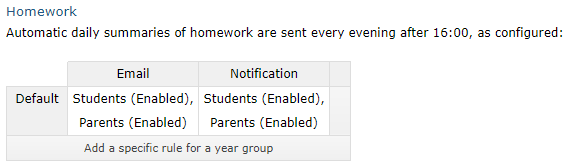
If you have the homework module, the next setting allows you to choose who receives the daily summaries of homework, via email and mobile app notifications:
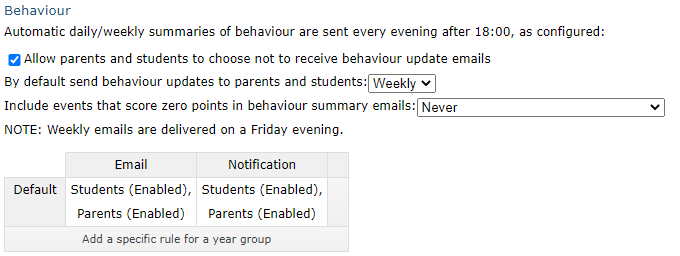
If you have the behaviour module, the next setting allows you to choose whether to send out a daily or weekly behaviour summary email, as well as allow parents to opt-out, and whether 0-point behaviour events should be included:
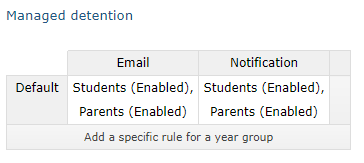
If you are using the managed detention system and have notifiable detentions, you can once again set whether students/parents receive emails or mobile app notifications:
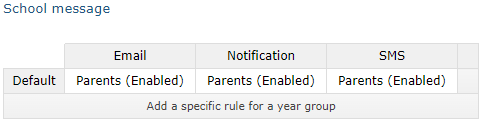
Ad-hoc messaging and attendance messaging are both only available to parents, but you can control whether the messaging allows each channel to be used:
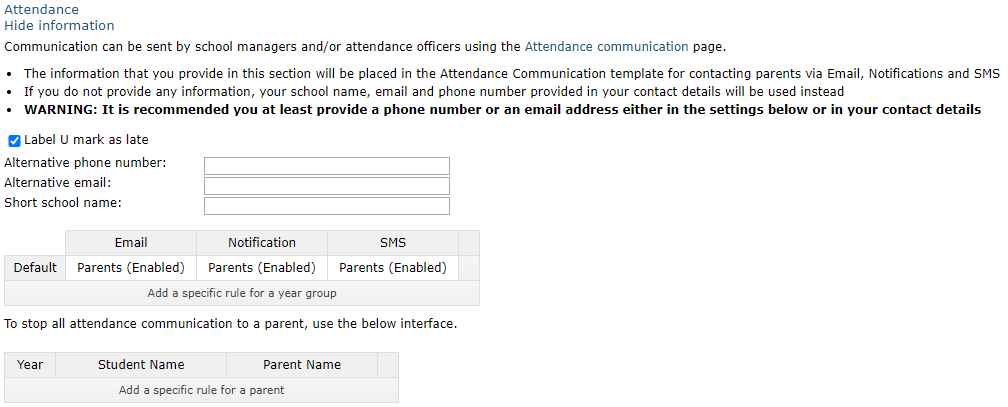
For attendance messages, you can set alternative email addresses/phone numbers for parents to contact instead of the default school number as set on the Contact details and settings page. You can also shorten the school name, and choose to treat a U as a late instead of an absence. As reason for absence is a statutory requirement, GO 4 Schools has not allowed parents to completely opt out of receiving attendance messages - instead requiring a parent to contact the school, who can add a rule to exclude that parent from attendance messages: