
Why hasn't my feed rule taken effect?
- You will only be able to see the impact of the rule created after we process a General feed from your school. Unfortunately, it is not possible to process the feeds required during the day.
- One reason your feed rule cannot take effect the next day is if we have not received or been able to process a General feed from your school. You can view more information on feeds using the Status and health check page.
- If you need to move students out of or into a locked subject, you can use the group membership tool which can be accessed from the Feed Rules page:
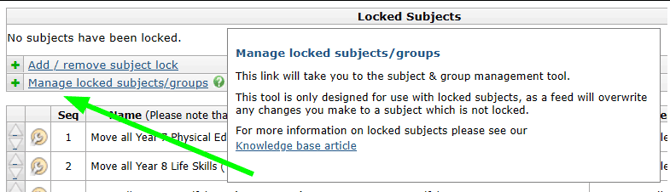
Further information on this tool can be found in the locking subjects knowledge base article. - Another reason why your feed rule may not be working could be due to the feed rule being based on a GO 4 Schools subject that is no longer being received in the feed from your school. The source subject needs to be in the feed for a feed rule to take effect.
- If you have created feed rules during the summer holiday, please note that during the summer holidays the feeds that are harvested from your MIS often do not contain necessary information such as student/group membership, so we are unable to process these feeds. This in turn means that new feed rules do not process over the summer holidays. If you need assistance with this, please raise a support ticket.
- We have encountered issues in the past where feed rules reference groups or subjects that have special characters in their name. If you believe this may be an issue for your rules, please raise a support ticket containing all of the details.
Can I change the name of a group created by a feed rule?
- Unfortunately, it is not possible to change the name of a group with feed rules as GO 4 Schools gives these a name automatically to ensure uniqueness We are aware schools wish to be able to do this and we plan to include this change in a future release of GO 4 Schools.
My feed rule is no longer working, why?
- This could be because the sequence of the rules has changed, or a rule has been disabled or removed. This can cause feed rules to fail if the rule was reliant upon the previous rule.
- Another reason could be due to the source data no longer being present in the feed we received from your school.
I need to add multiple rules for a new subject. How should I do this?
- When you create a new subject with a feed rule, you must wait overnight for the new subject to be created before you write any further rules that reference the new subject, otherwise you will end up with multiple subjects with the same name.
We would recommend that if you are unable to work out why your rule is not working, that you contact the support team. It is best not to add further rules as this may complicate the investigation.