
Report attribute data can be uploaded or downloaded from the report management page. This is useful to schools which want to include an average effort grade from aliased attendance lesson marks, or average cohort percentage attendance and similar data.
 The Download will return a CSV with all data associated with all report attributes populated in the report listed by individual student, attribute, and subject.
 This file can be used as a template to populate if you wish to upload data.
The Upload button takes you to a page to upload each report attribute. The upload will add attributes to attribute marksheets as well as the report writing page.
 First select the report attribute you wish to upload, e.g. Attitude to Learning, then select your file and continue.
The format of the CSV file must include the mandatory headings and the name of the attribute value must match the name in the download for one of the values below:
- The value
- The sequence
- The name
- The description
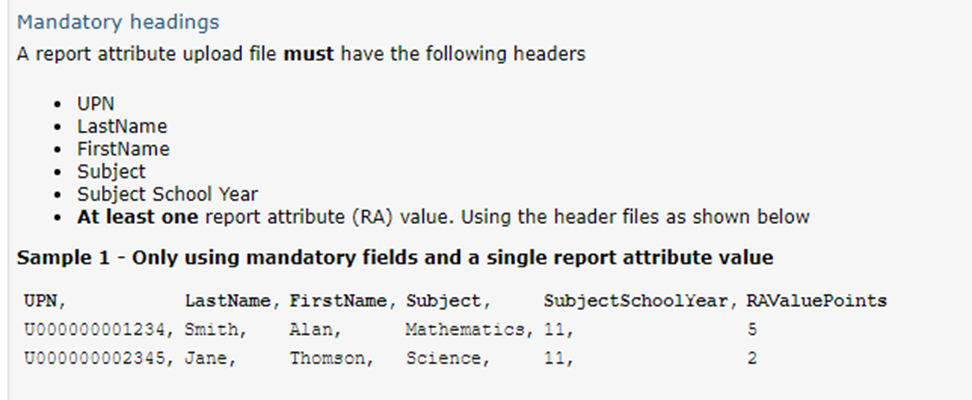 If you have a wide file format a Report attribute file conversion page is available as a link in order to transpose the file ito one line per student per subject. You need to ensure the subject names match those used in GO 4 Schools and the file contains UPN, lastname, firstname.
Once you continue with the upload a page will display to validate the data uploaded with any error codes so you can see where there is a mismatch in the data. All valid report attribute values can then be uploaded.
The Download gaps button will provide you with a download showing where values are missing.