
OCR National style marksheets are used to track progress on OCR National qualifications.
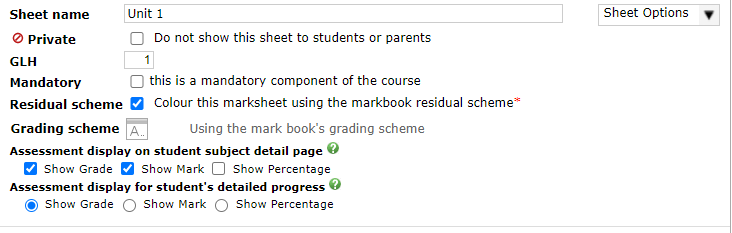
The top section allows the sheet’s name and Guided Learning Hours (GLHs) to be adjusted. You can select whether the sheet is a mandatory. A student cannot achieve a pass in the overall qualification unless they pass all mandatory sheets. You can also set a sheet to be private, meaning it is not visible to students and parents, by default this will set the sheet GLHs to zero, you can change this, but it can lead to parents and students seeing discrepancies when they see an overall grade. You can flag the sheet to use the residual scheme for the subject. Finally, you can set the assessment/marksheet visibility settings for the student page as well as in the markbook/marksheet.
The central section is set to be read only and shows that the grades will be calculated with the best fit, interpreting missing assessments as ungraded.

The bottom section lists the assessments themselves, which typically correspond to elements, but you can also add notes. You can add new assessments, change their names, order, due dates, etc. You can remove an assessment by clicking the the corresponding X button on the right hand side. In the Type column you can select whether the assessment is a standard element, or a Teacher's minimum grade. The teacher's minimum grade allows a teacher to set a minimum expected grade for a student on the unit. Assessments within this type of marksheet are always entered as grades, and you are unable to change the grading scheme.
