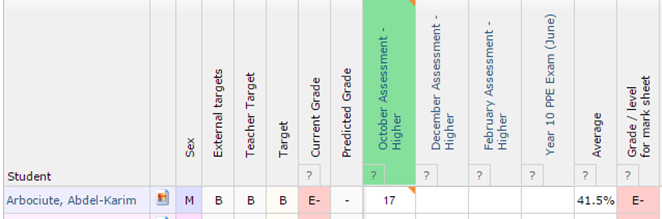
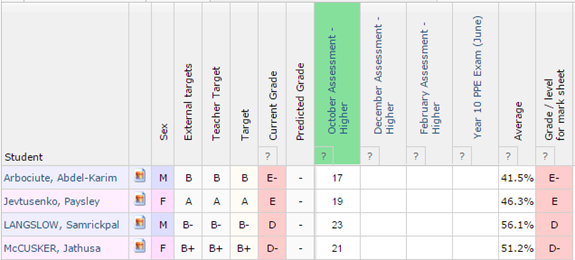
Formative assessments can be used to add more detail to a given mark/grade at the assessment level of the markbook. For example you can describe the reason a particular mark/grade has been awarded and also detail what the student needs to do to improve on that. If formative assessments are enabled for your school, the assessment headers will appear as blue links for you to click on, like the marksheet headers. Clicking on the assessment header will take you to the formative assessment writing page.
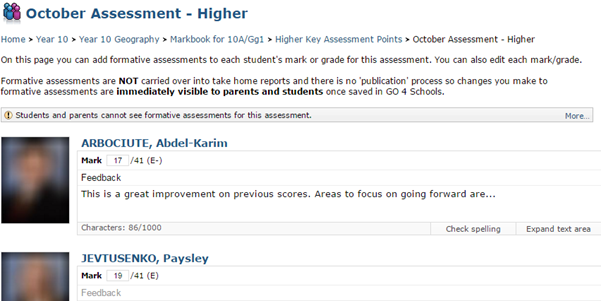
The mark/grade for each student will be shown with a free text box for teachers to write a formative assessment. Once you click inside the Description box you will see options to check your spelling and to expand the text box. You will also see a character count, which indicates the character limit. This can be increased/decreased by a school manager. If you enter a URL in this box, GO 4 Schools will convert it to a hyperlink when viewed on the student page. In the bottom right of the screen you can choose to Show student photos. When you are finished entering formative assessments, click the Save changes button in the bottom left of the screen.
 Once done, click on the marksheet name at the top of the page to return to the marksheet page. The presence of formative assessments is indicated by an orange marker in the corner of the marksheet and assessment header boxes. The marker is also shown in the cell of the individual mark/assessment where a formative assessment exists.